How to delete/archive employees

Last updated - March 24, 2022 at 3:55PM

Deleting employees is the same as archiving them. You will always be able to restore deleted employees from you archive to re-instate the employee or access historic timesheet data.

Steps to delete one or more employees:

  1. Navigate to Setup > Employees.

  2. Select individual employees to be deleted by clicking on each employee name to highlight the row.

  3. Click Delete within the left-hand side menu, to delete/archive the selected employees.

View deleted/archived employees:

You can view and restore employees from your archive list by navigating to Setup > Employees and clicking on Archived on the left-hand menu.
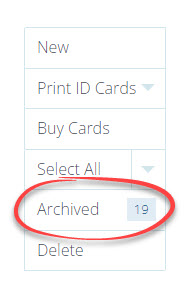
TimeDock employee archive menu item

See also

What are your top reasons for TimeDock?


Which options best suit how you operate?


Tell us about your organisation

How do you track time today?

Which features are essential?


How can we contact you?

Last question!

Thanks — we've got your details. We'll be in touch within 1 work day

Next
Get in touch