LockOut times
Last updated - Dec 08, 2025 at 4:00PM
LockOut times are a way to assign a schedule per device, for when staff cannot clock IN or OUT. If an employee attempts to clock IN or OUT during a LockOut time, a message will appear on the device notifying them that they are not permitted to clock IN or OUT at this time and to try again later.
Schedules can be applied at the device level to both mobile devices running the TimeDock app, and TimeDock wall-mounted devices (TimeTablet). LockOut times cannot currently be applied at an individual employee level.
When to use LockOut times
Use LockOut times to prevent staff from clocking IN or OUT during times when they are not permitted, such as outside of shift/contracted times or business hours. LockOut times ensure that you can maintain transparency, accuracy, and integrity of your timekeeping data, without the need to artificially alter employee clock times which can lead to disputes.
How to use LockOut times on a mobile device
To set LockOut times on a mobile device, please contact [email protected] to discuss your requirements and implementation.
How to use LockOut times on a TimeDock wall-mounted device
To set LockOut times on a TimeDock wall-mounted device running version 3.0.0 or higher, follow the steps below:
In your TimeDock web dashboard, navigate to Setup > Devices.
Click on the hardware device in the list.
On the General tab, set the Unlocked Between start and finish times.
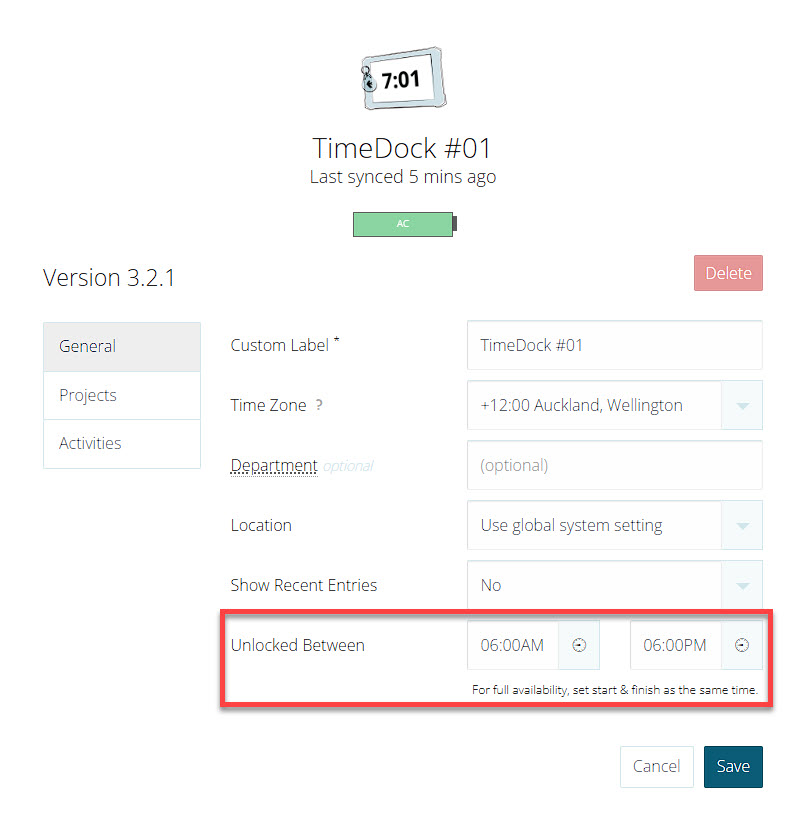
Click Save.